I recently was blessed with the opportunity to attend a conference that truly changed my whole way of thinking in education. While attending the Keystones Technology Innovators Summit at Shippensburg University, I was surrounded by educators who want use technology not only as a tool, but as a way of transforming the way their students learn. We had the opportunity to hear some amazing speakers including Aaron Sams (@chemicalsams) and Randy Ziegenfuss (@ziegeran). Both these speakers and many others expressed the need to refer to the SAMR model as we move through the digital conversion in our classroom.
During this time, I was reminded that Technology has always been entering the classroom. from the introduction of chalk, to the availability of pencils, all the way to one to one ipad conversions. What we run into is forgetting to ask ourselves, what is the purpose of this technology as I use it throughout my instruction. For those of you unfamiliar with the SAMR model. take a minute to watch this video.
What you will see is how Dr. Ruben Puentedura has developed a model that allows us to check the purpose and value of using technology in the classroom. The four stages of SAMR include Substitution, Augmentation, Modification, and Redefinition. I will spare you the reading and let you enjoy the video, it really is good, but I a going to briefly share how the four areas are different.
Substitution is simply replacing a tool (pencil and paper for a word document.) Augmentation allows you to change the product using technology (Fonts, boldface, size of paper.) These two steps only enhance the learning experience. This is obviously still a step in the right direction. But our call to action as educators is to transform the learning of our students. This can be achieved by utilizing the next two tiers of SAMR. Modification gives you an opportunity to give and receive feedback and alter your product using a variety of tech tools. Finally, Redefinition allows you to take a product to the next level by creating an entirely new product, rather it be a multimedia presentation or a interactive video.
So, the question to address here is how can I connect PBL and technology through the SAMR model. First, I think it's important to realize that PBL provides students with the opportunity to guide their own learning. This is vital because students are going to be working on and designing a product that they are personally invested in. Where technology comes into play here is being able to provide students with a large suitcase of tech tools that will allow them to plan, produce and present their product to their teachers, peers, parents, and the rest of the world. PBL provides a call to action, it gives a purpose for learning, the tech tools that you give your students provide them with the weapons they need to fight the fight. SAMR is really the training they need for the battle. How prepared do you want your students to be. By simply substituting or Augmenting assignments, you are not pushing your students to the next level. Now, please don't misunderstand. I do believe that this can and should be part of the proccess. IT could be a step in the direction of the final product, but it should not be the end all be all. By moving forward on the SAMR model you provide opportunities to Modify and redefine what the students are presenting. This is great because it really is full of opportunities. No longer to students need to be pigeon holed into a slightly enhanced learning opportunity, their options for production and presentation are only limited to the tech tools you provide access to.
https://www.commonsensemedia.org/videos/introduction-to-the-samr-model#
Sunday, July 31, 2016

Saturday, July 2, 2016
Why Project Based Learning?
I still have the bad taste in my mouth. Ninth Grade chemistry with Mr. Baylor. The horrendous flow chart. I never was one for memorization, especially in a class that had some many fun things to explore.... like BUNSEN BURNERS! Yet, I was in a "look but don't touch" environment for most of my "incarceration?" because of my inability to MEMORIZE A FLOW CHART!
Skip ahead a few years. Junior year of college. I was in my social studies and science education block. I remember walking in and seeing a substantially large cardboard box, about the size of a small chest freezer. One by one we were asked to climb into the tight quarters. After squeezing my quite large six foot frame inside, it took all of my mental strength to handle the 30 seconds of urine attacking my nostrils as well as the dirty, filthy, only God knows what touching me. After those 30 seconds were up and I was allowed to vacate this brief hell I was in, I was told that what I just experienced was a microscopic sample of what a slave might have experienced on his travels to the new world. I was hooked. I couldn't wait to listen to or read whatever was about to be put in front of me.
Why do I share these two experiences. Neither one is Project-Based. The big difference between the two: I was given a purpose to learn in the 2nd scenario. I was excited. I craved the learning experience. On the other hand, I passed with a 61 in freshman chemistry and to this day I believe it was because my teacher didn't want to have to deal with me again. The worst part, I really have a part of me that craves that basic understanding of chemistry. I had such a desire to learn, it just wasn't fostered. I believe that PBL provides that drive for learning that so many students are desperately craving.
That brings me to the purpose of this post. It isn't just to convince you (or myself right now) why hours, and hour, and hours should be spent on the planning and preparation for PBL, but really to give justifications for the validity of PBL.
I believe a couple questions need to be asked before we spend the time proving the worth of PBL.
So how can we assess that students are acquiring information, make meaning of it, and transfer it to new situations that can be utilized in the real world. This one graphic got me hooked on PBL and the ability to assess within. My mind went down the proverbial rabbit hole of my current curriculum, but it was the key to my understanding and practicing of PBL

References
Skip ahead a few years. Junior year of college. I was in my social studies and science education block. I remember walking in and seeing a substantially large cardboard box, about the size of a small chest freezer. One by one we were asked to climb into the tight quarters. After squeezing my quite large six foot frame inside, it took all of my mental strength to handle the 30 seconds of urine attacking my nostrils as well as the dirty, filthy, only God knows what touching me. After those 30 seconds were up and I was allowed to vacate this brief hell I was in, I was told that what I just experienced was a microscopic sample of what a slave might have experienced on his travels to the new world. I was hooked. I couldn't wait to listen to or read whatever was about to be put in front of me.
Why do I share these two experiences. Neither one is Project-Based. The big difference between the two: I was given a purpose to learn in the 2nd scenario. I was excited. I craved the learning experience. On the other hand, I passed with a 61 in freshman chemistry and to this day I believe it was because my teacher didn't want to have to deal with me again. The worst part, I really have a part of me that craves that basic understanding of chemistry. I had such a desire to learn, it just wasn't fostered. I believe that PBL provides that drive for learning that so many students are desperately craving.
That brings me to the purpose of this post. It isn't just to convince you (or myself right now) why hours, and hour, and hours should be spent on the planning and preparation for PBL, but really to give justifications for the validity of PBL.
I believe a couple questions need to be asked before we spend the time proving the worth of PBL.
- Why change? What's wrong with the way we're doing things.
- What's the real goal in education?
- What's our role as teachers?
- What do we need to do to be successful.
The overly used saying goes, "Why fix it if it's not broken?" Well folks, its broken! It needs fixed. Students are bored. We spend more time generating mundane test-prep activities than we do actually getting to know our students. We mask our distaste for test-based curriculum with peppy attitudes and sugar-coated learning games, but really, its a facade. And I swear, if I have to slap on that fraudulent smile for one more dog-and-pony show that we call a PSSA pep rally, I'm going to throw up my cafeteria chicken nuggets all over the front row of kindergarten students who still have no idea why were singing songs about taking tests. It's sad. It really is. Why are we doing this? We know it doesn't hold value.
We have to let go of the idea of what traditional education is..or was. "This history constrains our capacity to embrace the central role of the learner in his or her own education. We must rethink the very foundations of schooling if we are to base our practice on our understandings of learner's needs.' (Brooks, M., & Brooks, J. (1999, November)) We're all aware of it: not all students can learn all the material the same way or at the same time. Yet we continue, at least as a whole, to succumb to a pre-determined scope and sequence handed down from above, and I'm definitely not referring to a higher being. So I guess the bigger question is why do we do it? What holds us back from doing what we know is right? The ramifications of state testing. Because "State Standards = State Tests; State Test Results = Student Achievement; Student Achievement = Rewards and Punishment." (Brooks, M., & Brooks, J. 1999, November) And we certainly don't want to get in trouble for doing the right thing (Even though we drill the idea of doing the right thing no matter the cost into our students character development activities as early as pre-school.)
The worst part about the whole thing... catering our curriculum to the tests provide results (or so the tests show), so we only promote this style of education. But fear of failure should not be the motivating factor in our decision to shape our educational approach. I think this is where we transition into asking "What's the real goal?"
Personally, I became a teacher because I was a bored student. I didn't want anyone to have to go through the daily routine of faking an illness (unsuccessfully every time) to stay home like I tried to do. I also realized as I grew older that it couldn't always be recess and gym. So the question becomes how do we make the learning experience purposeful and engaging while provided real-world connections that provide retention of acquired knowledge.that can be utilized in the real-world. Wiggins and McTighe say "If we don't give students sufficient ongoing opportunities to puzzle over genuine problems, make meaning of their learning, and apply content in various contexts, then long-term retention and effective performance are unlikely, and high schools will have failed to achieve their purpose." (Wiggins, G., & McTighe, J. (2008, May)) Enter PBL. Now, this isn't saying you eliminate your role as teacher, in fact, it grows. Wiggins and McTighe recommend the weaving of 3 instructional approaches: Direct Instructor, Facilitator, and Coach. (Wiggins, G., & McTighe, J. (2008, May)) Why is a combination of these three roles so important, why so complex, well because learning is complex. "Learning is a complex process through which learners constantly change their internally constructed understandings of how their worlds function. New information either transforms their current beliefs-or doesn't. The efficacy of the learning environment is a function of many complex factors, including curriculum, instructional methodology, student motivation, and student developmental readiness. Trying to capture this complexity on paper-and pencil assessments severely limits knowledge and expression." (Brooks, M., & Brooks, J. (1999, November))
The very last part of that statement is the kicker. The whole purpose of the standardized tests (and our current way of creating and delivering curriculum) is because its placed in a pretty package. Easy to produce, easy to administer, easy to grade, Therefore, the powers that be have decided, "let's just do this, it looks good enough." Well maybe not quite that way but you get the idea. I mean it makes sense on some whacky, the students well-being doesn't matter sort of way. But we all know it's clearly not the best way. I genuinely believe even the "man in the educational high castle" as well as all his minions would agree that it's not the best way, it just works.
Our real purpose should be helping our students gain knowledge and understanding, Our job is to assess that this is happening. If we disagree with the use of paper and pencil test, than what's the alternative. How can I be efficient and still be valuable. Out of all the articles I read for this unit, one graphic got me more excited than anything else. But before I show it to you I have to refer back to Wiggins and McTighe:
"Learning for understanding requires that curriculum and instruction address three different but interrelated academic goals: helping students (1) acquire important information and skills, (2) make meaning of that content, and (3) effectively transfer their learning to new situations both within school and beyond it."
Wiggins, G., & McTighe, J. (2008, May)
 |
| Wiggins, G., & McTighe, J. (2008, May) |
I felt this was so important to share because I think it sums up the value and practicality of PBL. Even as a first grade teachers this provided me with an indefinite number of ideas on where to proceed. I think it was the match that lit the fuse as it pertains to pursing PBL in my classroom. It has me excited to try harder for my students and I think that answers the question, Why Project Based Learned? Because we need more as teachers, our kids deserve more, and what were doing isn't working. PBL is purposeful, its meaningful, and it holds real-world advantages. And all pedagogical reasoning aside, it just seems like more fun than a manual.
References
Brooks, M., & Brooks, J. (1999, November). The Courage to Be Constructivist. Retrieved July 03, 2016, from http://www.ascd.org/publications/educational-leadership/nov99/vol57/num03/The-Courage-to-Be-Constructivist.aspx
Wiggins, G., & McTighe, J. (2008, May). Put Understanding First. Retrieved July 03, 2016, from http://www.ascd.org/publications/educational-leadership/may08/vol65/num08/Put-Understanding-First.aspx
Tuesday, June 28, 2016
Project Based Learning (PBL) - Reaching the Gold Standard
Each year I watch teachers work hard to transform their instruction to meet the needs of 21st century learners. As a group of educators, we slowly continue to make the transition from whole-group instruction to small-group, we move our role from instructor to facilitator, and continue to search hard to find ways to include technology to keep our students engaged for as long as we possibly can.
I have watched as teachers, who have done it "their way" for years begrudgingly make the transition from their whole group to small group instruction, working hard to create center-based activities, and trying hard to keep up with the fast paced entrance of technology that continues to force its way into the classroom. Although these methods and ideas continue to invade teachers repertoires, one method continues to fight hard to make it's way into the mix....PBL, or project-based learning.
My personal belief for PBL struggling to become so widely used is the complexity of preparation that it brings. I recently watched some videos on edutopia.com which modeled some exemplar classrooms using PBL, and from the outside looking in, it might look as if the students are the ones doing all the work. But upon closer examination, that would be exactly what the teachers want you (and their students) to think. Most of the work that is done by the facilitators are done behind the scenes. This includes setting up field trips, organizing a variety of experts to be available to the students, and making sure the students have the appropriate expectations laid out for the length of the PBL opportunity. The great thing watching these students work through this process is the amount of authentic learning that occurs. Ultimately, this is the main goal of PBL, creating authentic learning opportunities that incorporate a variety of standards and allow students to have accountability while sharing their learning.
In order to make sure PBL is not just another fad in learning, The Buck Institute for Education has created a set of Gold Standards.
The graphic above shows you the a representation of what the gold standard for PBL looks like. At the center of every PBL should be an in-depth understanding of standards and concepts. It also must be based around critical thinking, problem solving, and self-management. Each PBL should begin with a challenging question which will help make the learning more meaningful. Sustained inquiry is a cyclical process that does not involved a simple text-book reference, but more of an in-depth search for answers. This could include a variety of resources, including expert interviews. Once answers are found, students dive deeper into their questioning and begin the process again in order to find more detailed information. In my opinion, one of the most important features of a PBL is the authenticity that it brings to the table. This is the "real-world" learning experiences that are provided from the learning opportunity. One of the best examples of this is from one of the videos I recently watched. In Eeva Reeder's geometry class, students are working hard to design what a school might look like in the year 2050. Not only is this a perfect example of what an authentic learning experience looks like, but it has the total gold standard package. Click here to read about and watch Ms. Reeder's class in action. Fewer things bring engagement more than giving students voice and choice in their learning opportunities. This makes it an easy selection as part of the gold standard. "More advanced students may go even further and select the topic and nature of the project itself; they can write their own driving question and decide how they want to investigate it, demonstrate what they have learned, and how they will share their work." (Larmer, 2015) At times, reflecting on an experience can be more valuable than the experience itself. That is why reflection is a crucial aspect of the gold standard. This includes students reflecting and evaluation how they might approach their next project. The next step might be the hardest pill to swallow, and it's something that needs to be taught as much as anything. Critique and revision might be one of the more difficult aspects of the gold standards in PBL, but it is definitely a crucial step. This does not only include critique from peers and teachers, but from real-world experts as well. This is just another step that gives PBL opportunities their authenticity. Ultimately, a PBL would be nothing without the public product. Not only does this add more authenticity, but it gives accountability to each student. What better way to demonstrate learning than to share your learning with parents, teachers, peers, and members of the public.
Each year I watch teachers work hard to transform their instruction to meet the needs of 21st century learners. As a group of educators, we slowly continue to make the transition from whole-group instruction to small-group, we move our role from instructor to facilitator, and continue to search hard to find ways to include technology to keep our students engaged for as long as we possibly can.
I have watched as teachers, who have done it "their way" for years begrudgingly make the transition from their whole group to small group instruction, working hard to create center-based activities, and trying hard to keep up with the fast paced entrance of technology that continues to force its way into the classroom. Although these methods and ideas continue to invade teachers repertoires, one method continues to fight hard to make it's way into the mix....PBL, or project-based learning.
My personal belief for PBL struggling to become so widely used is the complexity of preparation that it brings. I recently watched some videos on edutopia.com which modeled some exemplar classrooms using PBL, and from the outside looking in, it might look as if the students are the ones doing all the work. But upon closer examination, that would be exactly what the teachers want you (and their students) to think. Most of the work that is done by the facilitators are done behind the scenes. This includes setting up field trips, organizing a variety of experts to be available to the students, and making sure the students have the appropriate expectations laid out for the length of the PBL opportunity. The great thing watching these students work through this process is the amount of authentic learning that occurs. Ultimately, this is the main goal of PBL, creating authentic learning opportunities that incorporate a variety of standards and allow students to have accountability while sharing their learning.
In order to make sure PBL is not just another fad in learning, The Buck Institute for Education has created a set of Gold Standards.
 |
| Image taken from http://bie.org/blog/gold_standard_pbl_essential_project_design_elements |
These standards are the baseline for establishing PBL opportunities in the classroom. As a first grade teacher, I am still skeptical to how this can all be done, but I am not skeptical that it is worth it, and where there is a will, there must be a way. If you need convinced on the validity of the value of PBL opportunities, look no further than the following videos.
More fun than a barrel of ....Worms?! - Curiosity about a classmate's cystic fibrosis leads to a study on genetics.
March of the Monarchs - students follow the butterflies' migration.
As a primary level teacher, I see the excitement and importance of PBL, especially after the previos videos. Over the next few weeks, as my excitement and learning grow, I hope to share with you how we can make PBL's a viable learning opportunity in any classroom.
Resources
Resources
Larmer, J., & Mergendoller, J. (2015, April 21). Gold Standard PBL: Essential Project Design Elements. Retrieved June 28, 2016, from http://bie.org/blog/gold_standard_pbl_essential_project_design_elements
Curtis, D. (2001, October 01). More Fun Than a Barrel of . . . Worms?! Retrieved June 28, 2016, from http://www.edutopia.org/more-fun-barrel-worms
Curtis, D. (2002, June 06). March of the Monarchs: Students Follow the Butterflies' Migration. Retrieved June 28, 2016, from http://www.edutopia.org/march-monarchs
Armstrong, S. (2002, February 11). Geometry Students Angle into Architecture Through Project Learning. Retrieved June 28, 2016, from http://www.edutopia.org/mountlake-terrace-geometry-design
Tuesday, June 25, 2013
Virtual Field Trip - Google Earth Assignment
For our final assignment in my EDIM 508 class, we were asked to create a virtual field trip using Google Earth. I have used Google Maps before in my first grade classroom as part of our map unit and introducing maps. The only prior experience I have had with Google Earth was just browsing, and things have changed very much since the last time I used it.
I chose to take my students on a virtual field trip to see different volcanoes in the United States. The main purpose of this field trip was to expose them to volcanoes and help them to understand what they are. This would lead into further lessons of the layers of our earth and how other land forms are formed. I think the Google Earth assignment comes with both pros and cons.
The obvious pro of this activity is that this gives students an opportunity to see the actual location of each of these volcanoes and what it looks like. I do like the ability to add information to the locations and its very nice to have the ability to add pictures or even overlay them directly on the map. It was nice to loop our field trip back to our school to finish up the assessment and it felt, to me, that we really completed our field trip by coming back to our original spot.
One very big con to this was the user friendliness of the software. I feel that it does not present the tour/trip in a way that a new user could just pick up and run with. Even in the upper elementary I feel that the students would need serious direction, and for my first graders I would have to lead them through this adventure.
After completing, I don't know how often I would use this type of field trip in my own classroom at this time, but I do want to stay close to this idea because if it were more user friendly or primary friendly I might be more apt to use it frequently. Again, it does create a nice opportunity for students to be exposed to the actual locations of the landmarks.
You can view my virtual field trip on volcanoes here.
I chose to take my students on a virtual field trip to see different volcanoes in the United States. The main purpose of this field trip was to expose them to volcanoes and help them to understand what they are. This would lead into further lessons of the layers of our earth and how other land forms are formed. I think the Google Earth assignment comes with both pros and cons.
The obvious pro of this activity is that this gives students an opportunity to see the actual location of each of these volcanoes and what it looks like. I do like the ability to add information to the locations and its very nice to have the ability to add pictures or even overlay them directly on the map. It was nice to loop our field trip back to our school to finish up the assessment and it felt, to me, that we really completed our field trip by coming back to our original spot.
One very big con to this was the user friendliness of the software. I feel that it does not present the tour/trip in a way that a new user could just pick up and run with. Even in the upper elementary I feel that the students would need serious direction, and for my first graders I would have to lead them through this adventure.
After completing, I don't know how often I would use this type of field trip in my own classroom at this time, but I do want to stay close to this idea because if it were more user friendly or primary friendly I might be more apt to use it frequently. Again, it does create a nice opportunity for students to be exposed to the actual locations of the landmarks.
You can view my virtual field trip on volcanoes here.
Friday, June 21, 2013
Unit 6 - The Respectful and Ethical Mind
When it comes to activating and developing the respectful and ethical minds in my students, I like to think that I begin this process at the beginning of the year in first grade. During the first week we read a book about good decisions and manners in school. At the end of the book, it shares some rules and manners that students from other countries follow during their school days. The students are immediately very intrigued by many of them. It gives us a good conversation starter on how important it is to follow our own rules but to be respectful of others rules or traditions/routines that we may not be familiar with or accustomed to. We follow up with this story by creating our own set of classroom expectations and procedures as a community of learners in our classroom. After reading and looking a little further into epals, I would like to add technology to this experience by giving my students or the class as a whole an opportunity to communicate with classrooms from other areas first hand in order to better understand what types of expectations and cultural traditions are commonplace in their learning environments. I could see this continuing throughout the year with many other areas for learning, but I do like that this could set the tone for understanding others points of views and cultures from day 1. Although engaging the respectful and ethical mind is commonplace in our classroom, I do feel that my students need to be exposed to many other views during a young age. Many of my students have little exposure to anything outside of our small town, so by allowing them to work, talk, and collaborate with others, this would better prepare them to accept and understand others much better. I see that incorporating technology will allow me to not only expose them to others, but also allow them to be a part of the conversation and answer their own misconceptions as well. I look forward to seeing this play out in the upcoming school year.
Sunday, June 16, 2013
Glogster and the Creative Mind
As part of my EDIM 508 class, we were asked to create a glog to use for instructional purposes. The most difficult part of this assignment was finding a way to create an assignment that a first grader could complete independently while still fostering the growth of the creative mind. I decided to create an opportunity for students to learn the difference between fiction and non-fiction texts. In my glog students had the opportunity to listen to a few different stories and then take a short self-assessment on their ability to delineate between the two. After having the opportunity to hear different stories, students will focus on the fiction texts. Students will watch a video where other students around their age level give a book review of fiction stories. A final assignment will include the student choosing a fiction book from our class library and writing a book review of the story. This will allow me the opportunity to assess their ability to distinguish between fiction and non-fiction based on their book selection. It will also allow me to understand their comprehension and retelling skills.
One of the main concerns with this project was the students ability to understand how to use the glog and their ability to complete the assignments independently. Now that I have used Glogster, I believe it will be much easier to create glogs when the opportunity arises. I would have liked to add voice to the instructions but I struggled to get the "Grab" option to cooperate with me. With more practice this would be a highly beneficial tool to use, especially with this age/grade level. I look forward to creating more of these throughout the school year as the opportunity presents itself, and I would like to have the opportunity to see how the students respond to such an activity. You can check out my glog by clicking here.
One of the main concerns with this project was the students ability to understand how to use the glog and their ability to complete the assignments independently. Now that I have used Glogster, I believe it will be much easier to create glogs when the opportunity arises. I would have liked to add voice to the instructions but I struggled to get the "Grab" option to cooperate with me. With more practice this would be a highly beneficial tool to use, especially with this age/grade level. I look forward to creating more of these throughout the school year as the opportunity presents itself, and I would like to have the opportunity to see how the students respond to such an activity. You can check out my glog by clicking here.
Tuesday, June 11, 2013
Content Creation - A student's take.....
In order to understand how my students felt about creation during their year in first grade, I decided to make it a group discussion. Instead of a one on one interview, the students seem to be more eager to share opinions once the conversation gets going.
I started by discussion the word "creating" with my students and then asked them what their favorite thing was that we created this year. The most common answers all had to do with something related to art. We used a site called "Kerpoof" this year and this seemed to be the most common answers. Because we just learned how to use the site near the end of the year, I allowed for the students to create something with very little rules and restrictions. The students shared that they enjoyed adding "speech bubbles" and giving their characters and comic a "voice." There favorite part was that they could print their comic when they were done. After more conversation, the students shared that even though some of their comics looked the same, they were very different from their friends when they gave their characters voices.
What I really took from this and students like to learn technology through practice. They also seem to be very adamant about having something physical to show upon completion. With our digital stories on robots, students had to view their story online, and some did not have this opportunity at home. With "Kerpoof", students had the opportunity to have something physical to show off. I think this is something that commonly gets lost during digital creation and something I will definitely keep in mind during digital instruction and the early elementary level.
I started by discussion the word "creating" with my students and then asked them what their favorite thing was that we created this year. The most common answers all had to do with something related to art. We used a site called "Kerpoof" this year and this seemed to be the most common answers. Because we just learned how to use the site near the end of the year, I allowed for the students to create something with very little rules and restrictions. The students shared that they enjoyed adding "speech bubbles" and giving their characters and comic a "voice." There favorite part was that they could print their comic when they were done. After more conversation, the students shared that even though some of their comics looked the same, they were very different from their friends when they gave their characters voices.
What I really took from this and students like to learn technology through practice. They also seem to be very adamant about having something physical to show upon completion. With our digital stories on robots, students had to view their story online, and some did not have this opportunity at home. With "Kerpoof", students had the opportunity to have something physical to show off. I think this is something that commonly gets lost during digital creation and something I will definitely keep in mind during digital instruction and the early elementary level.
Friday, May 31, 2013
Creatitivity in Schools
When you think of creativity in school, most people refer to the arts. Budget cuts across education have forced many schools to reconsider the necessity of these areas. In a world of continually growing demands of standardized testing, creativity has been forced to take a back seat in our schools. I have heard multiple teachers share the idea, "If it's not on the test, there's no time for it in our classroom." As a first grade teacher I do not have quite as many demands on me as teachers in the upper elementary and beyond do when it comes to standardized testing, but even without that demand, I feel a pinch for time with district expectations for core subjects. So what is the school's role in the creative process, especially when the arts are slowly being eliminated from our schools?
Do schools kill creativity?
In his Ted Talks, Ken Robinson states that students "don't grow into creativity, they grow out of it" (Robinson, K, 2007). According to this belief, it is our job as educators to not develop, but to foster creativity in our students. It is much more difficult to encourage creativity than it is to encourage the already creative mind. So how do we do this? Ken Robinson believes that, "If your not prepared to be wrong, you can't be creative" (Robinson, K, 2007). As a first grade teacher, its easy to witness the fearlessness of failure, and along with that the phenomenon of natural creativity. Students at 5,6, and 7 year old salivate over the opportunity to express themselves through art and creativity, but as the demands of our rigourous curriculum get their hands on them, they slowly experience that wrong answers and mistakes are common in education. I believe that it is important for students to experience failure and mistakes, but how we help our students deal with that and overcome those mistakes will have everything to do with their comfort levels in creativity. So how do we help students incorporate their desire to express themselves artistically while meeting the demands of a content heavy curriculum? I believe that technology holds the answer.Digital media and creativity in the classroom....
With a plethora of online software and applications available through computers and other media devices, opportnities for students to be creative with technology is everywhere. Writing in first grade is a detrimental part of our curriculum, and because of this it is very time consuming. Every year I have a decent percentage of my class that will write, but demands a high level of motivation from me to fight through the difficult process. This year was the first of my three years that I decided to incorporate digital storytelling in my classroom. Students were informed that their writing would be turned into a digital story, but this would take some creativity and a lot of hard work on their part. There wasn't a student in the class not willing to take on the task. There was one particular day when students were doing some final touches on their illustrations for their story and it was time to stop to move to recess. The students literally asked me if they could "do recess later so they could work on their projects." I don't know if this is common, but this was completely a new feeling to me. In an area where my motivation to students was required to help them through, ALL students were not engaged in order to finish their illustrations so we could scan them into the computer. Creativity was present and the students were in love. They knew that right around the corner they would be on the computer narrating their stories and adding their illustrations to their words on the screen. This was their story, and their creation, and even though it was writing it didn't matter.I know this is just a single example of how creativity motivated my students, but I have other since this project, and I am sure many more to follow. There are so many ways to incorporate creativity and the arts into our core subject areas, so they no longer need to be viewed as seperate entinties but as collaborative tools that our students can use. Digital media and technology has made it easier than ever to allow students to express their creativity while demonstrating their understanding of the necessary areas, so why not let the two go hand in hand so we can continue to aid students creativity and not kill it.
Robinson, Ken. (2007). Sir Ken Robinson: Do schools kill creativity? – January 2007. Retrieved May 27, 2013 from YouTube Website: http://www.ted.com/talks/ken_robinson_says_schools_kill_creativity.html
Wednesday, May 29, 2013
Media Infused Project
As part of my EDIM 508 class, we were asked to create a Media Infused Presentation. The purpose of the project was to help us to learn to foster the development of the disciplined and synthesizing mind. Because this was my first time using Prezi, and I teach at the lower elementary level, it was difficult to create a project that focused on these skills while creating something that could be used independently in the classroom.
My favorite part of using Prezi was that fact that it allowed me to create a presentation that a student could use independently at a learning center. The content of my Prezi was based on the Life Cycle of a Butterfly. Before and after each section of the presentation, students were asked to think about what might happen, and follow up with what happened throughout the life cycle. Although this did not necessarily foster the development of the synthesizing mind, students would be expected to make connections to other life cycles that we have looked at in previous units of study. They would have to draw on prior knowledge and understanding in order to make predictions of what would happen in the life cycle of a butterfly.
By allowing students to be exposed to multiple forms of media and complete the lesson independently, it would also allow for me to work with other small groups to follow up on the lesson. This would be an opportunity to connect other activities that would help me to encourage the use of the disciplined and synthesized mind.
The hardest part of this assignment was trying to develop a presentation that could be completed in parterships of independently with 5-6 year olds while trying to foster the disciplined mind. Now that I am gaining more undertanding of what types of lessons this would entail, as well as understanding how to use Prezi, I think future projects will be much easier to create and implement with this age group. I look forward to creating many of these over the summer to use in my classroom for the upcoming school year.
You can view my Prezi on "The life cycle of butterflies" by clicking here.
My favorite part of using Prezi was that fact that it allowed me to create a presentation that a student could use independently at a learning center. The content of my Prezi was based on the Life Cycle of a Butterfly. Before and after each section of the presentation, students were asked to think about what might happen, and follow up with what happened throughout the life cycle. Although this did not necessarily foster the development of the synthesizing mind, students would be expected to make connections to other life cycles that we have looked at in previous units of study. They would have to draw on prior knowledge and understanding in order to make predictions of what would happen in the life cycle of a butterfly.
By allowing students to be exposed to multiple forms of media and complete the lesson independently, it would also allow for me to work with other small groups to follow up on the lesson. This would be an opportunity to connect other activities that would help me to encourage the use of the disciplined and synthesized mind.
The hardest part of this assignment was trying to develop a presentation that could be completed in parterships of independently with 5-6 year olds while trying to foster the disciplined mind. Now that I am gaining more undertanding of what types of lessons this would entail, as well as understanding how to use Prezi, I think future projects will be much easier to create and implement with this age group. I look forward to creating many of these over the summer to use in my classroom for the upcoming school year.
You can view my Prezi on "The life cycle of butterflies" by clicking here.
Sunday, May 26, 2013
The Synthesizing Mind
Working through this unit was difficult for me because I realize that I might not be reaching the needs of my students for developing a synthesizing mind. Although I see my students doing this, it is not an active practice for us in the classroom. After reading through Howard Gardner's "Five Minds for the Future", I realize I need to be actively engaging my students in this practice.
In order to synthesize, Gardner names four components: A goal, a starting point, a method or approach, and a draft.
One way my students completed these four component this year was through a project involving robots. We read both science fiction and non-fiction texts on robots, We watched an informational fiction film on robots and spent time discussing many advantages and disadvantages of robots. Our goal was to decide what life would be like with robots, we started by gathering as much legitimate information we could on robots, then we decided we would create a narrative to share our thoughts on how our personal life might be different if we had a robot. The final step (draft) came through a digital story.
I feel that due to the age level of the students, the amount of information, and the difficulty of the final project, students had to use a synthesizing mind in order to demonstrate their understanding of how life would be different with a robot. I have shared two stories below for your enjoyment.
Gardner, H. (2007). Five minds for the future. Boston: Harvard Business School Press. Kindle Edition
Monday, May 20, 2013
EDIM 508
Unit 2Two science units that I do in first grade are frogs and bees. Although I have a great amount of age appropriate books on the content, it is hard for the students to fully appreciate lify cycles of frogs without the videos from discovery. For frogs I use a video called "The development of tadpoles:Metamorphosis" to help the students get an up close and personal look at what happens during the process of metamorphosis. Although students already have some background knowledge on frogs and they are already engaged, this is when the students become highly interested in metamorphosis. Seeing this happen (even on a video) really helps to students to experience the change.
Another great video I use from discovery is for bees. Although I also use videos from Youtube and The Magic School Bus for bees, they all play a vital part in helping students to see first hand how bees communicate and work together. I have even had a local apiary come in with their bees but the kids still aquired more knowledge and were more engaged from seeing the up close action of the bees from the videos. Although I think it is important to provide real life expreiences as well as text to introduce and reinforce content, seenig the videos have helped students to better understand the information and retain much of the vital content.
Wednesday, March 13, 2013
Digital Media in the Classroom
Why Digital Media?
I just finished up my first graduate class in Instructional Media through Wilkes University. The class was "Internet Tools in the classroom" and helped me to get a good understanding of what tools are currently being used in the classroom. It also forced me to create this blog, something I was also very hesitant about but am very glad that I finally started. If you would like to read about some thigns I learned from that class, you can read some of my blog posts below.I am now starting an 8 week journey for my next two classes in the program. Digital Storytelling and Digital Media in the classroom. As a part of my first assignment for the latter class, I was asked to answer a few questions for the introduction portion in "twitter-style" Enjoy my short answers below.
- Who are you and what do you do? My name is Mike Balliet and I teach First Grade in Montandon, Pennsylvania
- What is your primary goal for taking this course? I want to increase engagement in my classroom while preparing my students to be successful in todays high tech society.
- What is your philosophy of education? My philosophy is to create and foster a love for learning while equipping kids with the tools and information necessary to be successful lifelong learners.
- What do you see as the greatest benefit of using technology and/or digital media in the classroom? A drastic increase in student engagement and the ability to allow students to see a much deeper perspective of content with more opportunities to actively use aquired knowledge.
- What is your biggest concern or challenge with using technology and/or digital media in the classroom? The strict filter used in our district for internet tools requires me to learn most programs or software at home. Also, making sure the technology is available for students to use.
- Provide an example of how you currently use technology and/or digital media in the classroom. I currenly use the MOBI digital presentation tablet, I have one Ipad but hard to use with a whole class. I also use behavior management software.
- How does your classroom today differ from when you were the same age as your students? Today, there are many more opportunities for visual learning. With youtube you can take students on a journey through lessons, have them share their answers online, and create digital presentations. It is much more engaging and more fast-paced, but also higher expectations.
Tuesday, March 12, 2013
Attending a Live Webinar
Live Webinars
I have attended live webinars for multiple reasons including job trainings, mandatory professional development events, and personal desire. As a part of our Internet Tools for the Classroom class, we were asked to attend a live webinar. I scheduled a live webinar for common core assessments through discovery education. Due to poor internet connectivity, my experience was interrupted shortly after the webinar began and I was unable to attend this webinar. I share this experience because I contacted the people at discovery education to ask how I could still view the content of this webinar. They informed that although they would be unable to share the information with me now, they would be archiving the entire series upon completion. This gave me the idea to start looking up archived webinar series. Wow! There are countless opportunities to take part in webinars on a variety of topics. Although I appreciate the opportunity to interact with the presenter in most live webinars, I realized that many webinars provided a post-webinar Q&A opportunity that can be referenced at your convenience.Because I recently received a district-issued Ipad to use in my classroom, I began to seek out webinars that would assist me in using this technology right away. One of the best adavantages of archived webinars is that you can view them at your own convenience while still receiving most of the benefits of viewing it live. I also didn't have to be present at a specific time, and internet connectivity wasn't an issue either.
The webinar I decided to view was though discovery education and it was titled "iPads in discovery education." Kyle Schutt was the presenter for this webinar. In this webinar, Kyle shared how to download videos from the desktop site to your computer. Since you can't stream the videos on your ipad from the desktop site, he demonstrated how to download the video, convert the format, load it one iTunes, and even create a playlist using multiple media files on the same topic. He also showed the much easier choice to use the mobile site for united streaming which allows you to stream directly. The nice thing about downloading them and placing them on iTunes is that you can access them even without having Internet connectivity. However, the mobile site for the ipad is very nice and extremely functional. You can view the ipad site by clicking here. (Subscription required) Kyle also shared his ability to project his ipad on the monitor by using a VGA input and an app program like expedition.
Although the webinar was designed to teach views how to implement use of discovery education on the ipad, Kyle did a great job at sharing some other great resources. I would like to share some of those resources below.
Livebinder - livebinder is an online "3 ring binder" that allows you to curate all your information on a topic and place it all in one neat "online binder." It's a great place to also research other topics and binders users have created. You can click here to explore for yourself.
IEAR - I education apps review is a community of ipad users that give feedback and reviews o educational apps for the ipad. You can search for specific apps or click on one of the various links on the page to research apps on a topic you are looking for. You can click here to view the page.
Now that I see the wealth of archived webinars, I plan on viewing more as I find them appropriate to my needs, still they do lack the interaction that Live Webinar offers.
After viewing the archived webinar, I had the opportunity to attend a Live webinar presented by the same presenter Kyle Schutt. He also has a co-presenter, Michael Gormon. The webinar titled, "Students as curators, managing new information in the digital classroom," was presented by Discovery Education as a part of a professional growth webinar series sponsored my Plymoth Rock Assurance.
The major advantage of the Live webinar was the opportunity to interact with the presenters as well as the other attendees. Below I have shared some of the notes I took while viewing the webinar. Ironically, I was using Evernote to take notes, which is one of the tools recommended during the webinar.
The common core - "Educators must share curriculum, effective instructional opportunities, and assessment in order for the school community to accomplish the goals of the common core.
Students use the internet as a consumer, but we want them to be a user and produce of information and reinvent information themselves
A brief timeline of curation - the slate, the textbook , the film strip projector , lesson plans, files, filing systems, failing cabinets and more filing cabinets, the computer , the floppy disc, the hard drive, the cd, the Internet, and now, the cloud,
The tools presented will help to answer the question, "How do you filter the information in the cloud? How to we sort through the information and make it useable, is it useable for all students (closed captioning, can the PDF be read?). Below is a brief description of the tools presented and how they can be used
- Symbaloo - free - create app style bookmarks for online sites /links/ resources. Organize and share the best of the web . Each icon is a link to the site. Symbalooedu.com shows how to use the site for educational purposes. You can discover other user's webmixes as well. Once you sign up for the site you immediately get the EDU webmix that recommends great sites to be used in education. You can choose web mixes for specific educational tools. The symbaloo gallery allows you to search specific topics and filter by popularity and views. You can also view user's webmixes when you find a user whose webmix you enjoy. You can have students create webmixes for subject/topic based purposes. You can share webmixes using the share tab using he HTML link. The URL eliminates the purpose to log in but still can access the symbaloo webmix. Gallery allows you to search other symbaloo galleries. You can add other users webmixes to your own webmix folder for future reference.
- Diigo - "Connect,organize, and online bookmarking" (similar to delicious). You can set up diigo account for your students. Free upgrade to education edition. Allows you to add extensions for your browser . You can search community library for other people's bookmarks on a specific topic. It shows views/ popularity ratings to.help you choose the right site. You can also view specific users to see what they are bookmarking
- Evernote - Evernote is a note taking app that allows you to sync across all devices. I actually used my Ipad to take notes during the webinar since I was using my laptop to view the webinar. I then logged on to the site on my laptop to view my notes to create this blog post. You can create collective notes as a class. Create multiple notebooks. You can share the URL for the note to share the opportunity to edit the note.
- Live binders - free - digital binder- can use livebinders for projects. There are tabs on each binder for subtropics on each binder. It can be used for presentation, digital story, steps in lab report, demonstration of learning, step by step procedure to show understanding. You can search for binders on topics such as the common core, then filter your results based on topics such as strictly education binders. You can sort by views/popularity and view that presenters other binders as well.
- My big campus - Collect, curate, and create. My bigcampus.com/getstarted gives you the opportunity to sign up for the site for free. Registrations takes a day or two to get set up because they make sure that you are an educator setting up the site. It has an Edmodo style feel. Teachers create bundles of information on a specific topic for students to access for assignment or instrution purposes. Example of bundles - teachers can curate multiple resources and documents on specific topic for student to view so they can access all content based on a topic. It also embeds YouTube videos directly on the page.
- Google custom search - you create a search engine for just one topic. Students could create their own search engine. You select the sites you want it to search. In order for the kids to use the modified search engine you will just have students type in that specific URL.
Some other quick references the Kyle and Mike shared included:
- Linkyy
- Scoop.it
- Educlipper - Pinterest style education site
- Printfriendly.com - you enter the URL of the site and hit ring preview and it will take out all adds . You can save it as a PDF to send or post on another web page.
- Know the site - get the know the site in and out. How to use it. Dangers for students to use the site.
- Know your district's AUP - does your district condone or allow the site
- Involve your school's administration - just because a site is blocked or filtered doesn't mean it needs to be. Keep your district officials informed of the opportunity and the possibilities of new sites and see if they can change access opportunities.
- Involve your parents - inform your parents of your involvement in the site and the opportunities for them to be part of it.
- Teach, model, and monitor digital citizenship - make sure you students understand the expectations and the students understand how to use the internet appropriately. Especially when introducing new sites.
To see additional information - check out Michael Gormons blog
Cell Phones in the classroom
Cell Phones in the Classroom Interview
As part of my Internet Tools in the classroom class, I was to interview a teacher and have them share their experience of using cell phones within the classroom. Because our district has a strict policy that students are not to have cell phones during school hours, most teachers have no tried using cell phones as an instructional tool. After asking around quite a bit, I was able to find a teacher who attempted to use it in the classroom. She shared with me some of the pros and cons of her attempt to implement cell phones in the classroom.
Janet Hook is a 7th grade math teacher at Milton Area Middle School. During her first year with the district, she was asked to attend a conference on how to implement the use of cell phones within the classroom. After attending the conference she received permission from the principal at the time to pilot some of the free services she learned about while at the conference. One of the requirements that Mrs. Hook needed to meet in order to use the cell phone programs was to have approval from all parents for their children to use the cell phones for school related activities. Janet said in all the classes she tried this with, she never had more than 75% of parents agree to allowing their children to use the cell phones for in-school activities. This was a problem because not all students could not be actively engaged. She did allow students who didn't have a cell phone to participate to share with another student, but they still weren't able to have the full experience, so this was a drawback for her.
Janet decided to pilot two types of cell phone services: Polling and Text Reminders. Mrs. Hook shared that it had been quite some time since she used the services, so she doesn't remember the specific names, however, she did share with me some details of her experience. Due to the fact of that we have a strict no cell phone policy in our district, Mrs. Hook decided to pilot the experience with her smallest class. Her class consisted of 7-8 7th graders. She used the polling site to have the students answer some math questions throughout the class. Most of her polling questions were taken from Studyisland, a site our district uses for benchmarking purposes. She shared that one of the strongest benefits of students using the cell phones in the classroom was the interest and engagement generated by the opportunity. The word of this opportunity quickly spread and many other classes quickly asked to have a chance to take part. Although the students were engaged, students quickly began to take advantage of this opportunity by using their cell phones for reasons other than class related activities. Due to this fact, and the fact that she has the opportunity to use CPS clickers for the same type of feedback, she decided to stop using them in class. This not only allows for all students to be involved, but also takes away the opportunity for students to take advantage of using cell phones in the classroom.
Ultimately, Janet shared that her favorite aspect of using cell phones in the classroom was the student excitement and engagement generated by the use of the technology. She did share that this same type of engaged excitement is generated by the clickers and the kindles she has available in the class. Janet stated, "Most people tell me technology needs to be used with a purpose, not just for the sake of using technology. But why not just for the sake of using technology if it means students will be engaged." I had to agree with Janet on this. If her students are more engaged using technology, why not do the best you can to implement technology in the classroom as much as possible.
Developing an online portfolio
You.com
For my final assignment in my "Internet Tools in the Classroom" class I was to create an online portfolio or create an online presence to share with others. While looking for a site to create this digital portfolio I looked through many sites, but narrowed it down to three sites. I have shared a brief description of the three sites and what site I ultimately decided to go with.vizualize.me - This site allows you to enter in your educational history and your work history. It creates a timeline on your homepage to share a visual timeline of both experiences. It does allow you to enter some other personal/professional information, but does not share this information on your homepage. It also limits your ability to share your social media outlets on the homepage. The site is in the beta stage, so I am sure improvements are on the way, however, this site did not offer the type of presentation I was looking for.
flavors.me - flavors.me and about.me are very similiar sites. They allow you to create a visual pleasing homepage with customizable background and allow for easy edits to the homepage. It does allow for you to edit a mobile version of your page, but this is only for premium users. The fee is only $19.99 a year. Although most of the options and features of the site are available for free, you're ultimately limited due to the need for premium membership. I did create a page using this site so that I have ownership of one, but I chose to to utilize this site as my primary outlet for my digital portfolio.
about.me - I decided to go with about.me for my online portfolio. This site is 100% free and couldn't be easier to use. It allows you to edit your background and create a bio on your homepage. It also allows you to easily add tabs so that viewers can access your social media pages directly from your about.me homepage. I kept my information brief due to the fact that I am very cautious of our districts regulations for social media right now, but I did explore enough to see all the options. You can also view your about.me site on mobile devices as part of a mobile platform. This site is extremely user friendly and well worth the time it takes to set up. You can view my about.me site by clicking here. If you enjoy my page please like my page and feel free to contact me via the site or any other social media site you explore on my page.
Sunday, March 3, 2013
Live Streaming - using Ustream
Live Broadcast on Ustream
After researching the options to broadcast live, Ustream.tv seemed to be the easiest way to go. The mobile application can be used on both droid devices and apple devices and you can also do it all from the website itself. When I first started thinking about this project I was a little nervous because I didn't quite feel comfortable and was even more unsure what I would broadcast about. After some contemplation, I decided to stream my girlfriend and myself cooking enchilada stuffed peppers. Before the actual broadcast, I practiced broadcasting from my computer, ipad, and droid cell phone. Ultimately, I went with streaming the broadcast from my cell phone due to poor internet connectivity in my house. Since I have 4g on my cell phone, it allowed me to stream with very little lagging. When I practiced on the Ipad and the computer, there were frequent breaks in the broadcast.
In order to promote the event, I posted the address and a description of the event on twitter throughout the day. I also texted the address of the broadcast to some close friends during the day. To help with the time of the broadcast, we had the ingredients prepared ahead of time. The vegetables were chopped, the peppers were in the water, and the Quinoa we boiling. When the broadcast began, I shared with the viewers why I was doing the project, what we were cooking, what ingredients we were using, and the steps. I encouraged viewers to use the social stream feature and talk to me during the broadcast. I did communicate with one user during the broadcast. I was able to make this happen by setting up my laptop downstairs while streaming from my phone. Using the cell phone was a little tricky because I wasn't able to flip from the front-facing camera to the rear-facing camera during the broadcast, so some of the broadcast is a little all over the place. All in all I thought the broadcast went well. I did talk to one of my friends after the broadcast and he shared that the broadcast was clear and easy to understand. I see how this would be neat to use in the classroom to share with parents a special event or a special lesson, however, I don't know if it would be possible unless all parents approved, and that is unlikely to happen.You can view a recorded version of the broadcast by clicking the link below.
Sunday, February 24, 2013
Social Networking in the First Grade Classroom
There seems to be a lot of social networking opportunities in the secondary realm of education, but I never saw it as a possibility in the primary classroom, at least before this course. I definitely see the drawbacks of using social media in the classroom. Some of these include the danger of privacy, the difficulty of teaching a young student the ins and outs of using the website, and the filter restrictions put on by a school district. Although these were all barriers for me to use social networking in my classroom, I still was able to find one that did not interfere with most of these and still serve an everyday purpose in my classroom.
For my assignment this week I was asked to take an established lesson plan or unit and implement social networking into it. My first idea was to use Edmodo, or another Twitter style website to have students document/publish their summary point writing. This would replace their summary point journals and give parents a chance to view what they had learned throughout the day. One of the drawbacks to this idea was the privacy factor. Although I know there would be ways to use this effectively, I wanted to dig a little bit deeper on ways to use social networking in the classroom.
I came across a site called Biblionasium. This site allows you to create a log-in as a teacher, then create user names and passwords for your students under your log in name. There is no need for students e-mail and no one can view your students names without being on your log-in. You can enter each students guided reading level so that the site can recommend books for each student based on their appropriate level. When students log in, they can search for books that they have read, log the book, give a review to the book (both pre-written or in their own words, and recommend the books to others in their class. One of the coolest features for the students is the ability to earn awards. After logging in for the first time, the students must agree to an honesty code. Once they do they receive an honesty award. Students can earn awards for their recommendations, their book logs, and even earn a gift card for completing reading challenges. You can also give student log-ins to parents so students can read books and log them at home, and parents can view what students are reading at school. The best social networking aspect of this site is that students can recommend books to others in their class, as well as view books that their classmates are reading. I feel this would motivate students to pick up a book that they would have passed over or neglected other times.
I would be able to implement this into my everyday lesson planning. Each day we spend an hour at Guided Reading and Centers. During this time, students rotate between three centers. Through the course of the week the students will visit 15 centers based on different skills we are working on in class. Each day one of the centers is always Self-Selected Reading. Students have 20 minutes to select any book(s) of their choosing to read at their independent reading spots during this time. Although we take time to review the ways to choose an appropriate book, I am not able to monitor their book choices regularly because I am reading with my guided reading groups during this time. I would use the site by having students log their books into a journal similar to the entry they would create on Biblionasium. Then, during lab time or in the morning, I would have students transfer/log the information into the website. This would also be something the students could use as a center during the Literacy Block time.
I have taken the time to create a log in and enter my classrooms information. I logged in as a student in order to try the site both as a teacher and a student. The site is user friendly and wouldn't take more than a week or two to have students trying it out independently. Since the students can use the site at home with parents, it will also allow them to become familiar with the platform away from school.
As a teacher I can add our classroom library to my bookshelf so students can view exactly what I have in my library. Although this would be time consuming, it would be something that could be done over the summer and introduced at the beginning of the year. I don't allow access to all my books at the beginning of the year because it would be overwhelming and almost all students are not ready for the reading level of all the books. By adding the books on this site it would allow students to get excited to read books or set a goal to be able to borrow a specific book when they are ready for it. Since the books are based on levels, students will have more accountability on their reading level and would possibly more motivated to set reading goals for themselves.
I can also create specific challenges for the class. This feature does seem a little bit difficult for the first grade level, it could be something I could use for my specific guided reading groups and be used during their guided reading time.
I can also add friends to our class that can only be approved by me. This could include other grade levels within our school or other first grade classrooms within our districts or other districts. This would allows students to view what other first graders outside of our classroom are reading and allow them to step outside of their comfort genre and try other books. Although I haven't used this in my classroom yet, I have sampled the site extensively and have implemented its uses into my daily lesson plans. Below you can see some screenshots of the site or click here to view the site yourself.

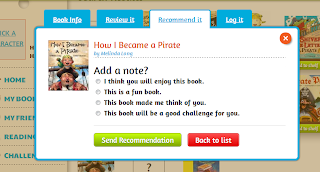


For my assignment this week I was asked to take an established lesson plan or unit and implement social networking into it. My first idea was to use Edmodo, or another Twitter style website to have students document/publish their summary point writing. This would replace their summary point journals and give parents a chance to view what they had learned throughout the day. One of the drawbacks to this idea was the privacy factor. Although I know there would be ways to use this effectively, I wanted to dig a little bit deeper on ways to use social networking in the classroom.
I came across a site called Biblionasium. This site allows you to create a log-in as a teacher, then create user names and passwords for your students under your log in name. There is no need for students e-mail and no one can view your students names without being on your log-in. You can enter each students guided reading level so that the site can recommend books for each student based on their appropriate level. When students log in, they can search for books that they have read, log the book, give a review to the book (both pre-written or in their own words, and recommend the books to others in their class. One of the coolest features for the students is the ability to earn awards. After logging in for the first time, the students must agree to an honesty code. Once they do they receive an honesty award. Students can earn awards for their recommendations, their book logs, and even earn a gift card for completing reading challenges. You can also give student log-ins to parents so students can read books and log them at home, and parents can view what students are reading at school. The best social networking aspect of this site is that students can recommend books to others in their class, as well as view books that their classmates are reading. I feel this would motivate students to pick up a book that they would have passed over or neglected other times.
I would be able to implement this into my everyday lesson planning. Each day we spend an hour at Guided Reading and Centers. During this time, students rotate between three centers. Through the course of the week the students will visit 15 centers based on different skills we are working on in class. Each day one of the centers is always Self-Selected Reading. Students have 20 minutes to select any book(s) of their choosing to read at their independent reading spots during this time. Although we take time to review the ways to choose an appropriate book, I am not able to monitor their book choices regularly because I am reading with my guided reading groups during this time. I would use the site by having students log their books into a journal similar to the entry they would create on Biblionasium. Then, during lab time or in the morning, I would have students transfer/log the information into the website. This would also be something the students could use as a center during the Literacy Block time.
I have taken the time to create a log in and enter my classrooms information. I logged in as a student in order to try the site both as a teacher and a student. The site is user friendly and wouldn't take more than a week or two to have students trying it out independently. Since the students can use the site at home with parents, it will also allow them to become familiar with the platform away from school.
As a teacher I can add our classroom library to my bookshelf so students can view exactly what I have in my library. Although this would be time consuming, it would be something that could be done over the summer and introduced at the beginning of the year. I don't allow access to all my books at the beginning of the year because it would be overwhelming and almost all students are not ready for the reading level of all the books. By adding the books on this site it would allow students to get excited to read books or set a goal to be able to borrow a specific book when they are ready for it. Since the books are based on levels, students will have more accountability on their reading level and would possibly more motivated to set reading goals for themselves.
I can also create specific challenges for the class. This feature does seem a little bit difficult for the first grade level, it could be something I could use for my specific guided reading groups and be used during their guided reading time.
I can also add friends to our class that can only be approved by me. This could include other grade levels within our school or other first grade classrooms within our districts or other districts. This would allows students to view what other first graders outside of our classroom are reading and allow them to step outside of their comfort genre and try other books. Although I haven't used this in my classroom yet, I have sampled the site extensively and have implemented its uses into my daily lesson plans. Below you can see some screenshots of the site or click here to view the site yourself.


My first week with Twitter
My Forced Submission to Twitter
Although I have always been eager to try the latest piece of technology and am constantly trying new apps on my cell phone, social networking, for me, has almost been limited to Facebook. Facebook met all my needs. I was able to share my thoughts or important events in my life (twitter) and post photos of what I had done or where I was visiting (Instagram). Although I wanted to stay clear of the Twitter world my assignment this week for my "Internet Tools in the Classroom" course was to join twitter, make friends with at least 50 friends a day, and post 6+ times each day. After being a part of Twitter for nearly a week now I can see how it can be very addicting. I think the purpose of the assignment was to help us dive a little deeper in the twitter world so I took it on full force. However, I did have a problem meeting the requirement to follow 50+ people a day. I feel that I would just be forcing myself to follow people or companies I wasn't even interested in. I am sticking to following anything I feel would interest me or might grab my attention. By overindulging into following people, I feel like I wouldn't pay attention to all the tweets on my feed page. I have to admit I am enjoying tagging people and the hashtag feature is gaining my attention quickly. Since it has only been a week I can't say whether or not I am not a lifetime member, but it will have my attention for a while, that's for sure. If you would like to follow me you can tweet me @mikeballiet. Stay up to date for more posts on my experience on twitter. #Ifinallygaveintotwitter.
Monday, February 11, 2013
Exploring new sites
Discovering Something New
Information overload is really taking over. There are so many quality sites out there. Using the RICE method or another "filtering" system to choose what sites to use and when will become more detrimental than ever. Below I have shared my experience on the suggested sites from the assignment.
Edutecher.net
The sign up for this site was very easy and fast. It also created a blog for me with my sign up. It was free and provided instant search directly from the homepage. My topic of choice was Greater Than//Less than. I was specifically looking for apps, lessons, and resources related to this topic. After searching I was prompted to filter my search before results turned up. I really liked the filter categories, but the results were very generic. Although I selected Math and Elementary, the sites listed for primarily Language Arts and the links did not connect me directly to my topic.
The positives were that the site provided multiple educational resources where I would be able to search for my topic. The results for the sites were all educational, which helped me to trust that the sites would guide me to the information I needed, but the search I began didn't lead me there directly.
The site does include an EdutecherTV tab which allows you to watch "how to" webisodes on topics such as "Brief Tips for Tech in Education" and "How to Set Up a Whiteboard." I don't know if it was connectivity or if it was the server for the site, but the videos took uncharacteristically long to buffer. It is a positive addition to the site either way. Some screenshots of the search filters and the Edutecher TV can be found below.The homepage for your site is easy to navigate. The layout is very fun and visually stimulating. Your "backpack" is like your homepage. All the tabs/icons are laid out on notebook paper which makes it fun. From your backpack you can access your favorites that you have tagged, view your notes, messages, and forums, as well as update your profile or blog. The site is very user friendly.
The site offers countless resources but it does take some searching through those supplemental sites to find what your looking for. All in all I will be using this regularly to research for resources and materials needed.


Go2Web20
Go2Web20 is a online index of "app-like" icons that offer a variety of resources, both for educational and personal use. The search results are very limited, and even the site suggestions are limited, but most that I have viewed are of high quality. On the homepage it has suggested tools/apps to try out. The nice thing about the site is when you scroll over an app it gives you a description of what the page is used for. When you click on the link it has a more detailed description as well as a link that connects you directly to the site/app. Some of the sites do cost money and/or require log in and personal information. I noticed that multiple sites were filtered on my school browser as well. Below I have listed some of the tools I discovered while searching the site. You can click on the link above to do some exploring on your own.- Kidoz - "A kids browser" - The description provided was pulled from go2web20.net. "The KIDOZ browser is a protected environment made for young kids that enables children to surf sites ,watch videos and play games. The system blocks links, scripts and any other attempts that lead to sites and content which have not been approved, preventing them being viewed by the children."
- Storyjumper - Storyjumper allows students, parents, and teachers to create and publish their own stories. It offers help with their on site tools such as "story starters" to help get you started on your own story. You can also add in your own illustrations and pictures to your story. You can share the stories online for free or have your hardcover copy published for $24.99. The site does require sign up with personal information.
Shrock Guide
Karen Shrock's Guide to Everything website is a teacher's resource/FAQ smorgasbord. There is no sign-up or log-in required to explore the resources on the site. Each topic clearly presented on the sidebar is full of textual references, weblinks, and supplemental resource links to explore the topic in further detail. I will use this site specifically throughout this course as it addresses QR codes and cell phones in the classroom. One major topic that it addresses on multiple occassions are IPADs in education. As a recent recipient of an IPAD in our district, topics such as IPADs in the classroom, learning and teaching with IPADS, and "A day in the life of an IPAD" provide multiple resources to further my education on how to use this valuable tool more efficiently and appropriately. The links seem to be all in tact, but it is also stated at the top of each page that she would appreciate if you would let her know if any link is down. It made me feel like there is a lot of care of the user of the site when reading this each time. I plan on referencing this site frequently, specifically during my time in this class.After viewing all three sites, they all are valuable and have strengths. I think that Go2Web20 was the most limited on information, and most of the links were caught by the filter in my district. Edutecher.net had a plethora of educational resources to use both in and out of the classroom, but definitely takes the most time to explore and sort out exactly what you would use the information for. Out of all three, the Schrock guide was the most detailed and easy to navigate. Although the topics aren't vast, they are detailed and hit relevant topics with technology in education. Although my time was limited to fully divulge myself into all three sites, they are all bookmarked under my "best resources" folder and I will be using these three sites over the course of the next few weeks to further learn how to use them effectively on a regular basis.
Subscribe to:
Posts (Atom)